If a guy is interested in 3D Graphics area of game(engine) development, its best recommended to make a rendering engine with features matching current technology standards or better. Instead of loading it with an array of rendering techniques that work okie dokie, its better to put in few but fast & consistently working features.
When I started writing a full-fledged game engine, I first wanted to get in a minimal set of features of all sub-systems of a game engine. Basic rendering, physics, game-play, AI, etc. But half-way down the development path, it became obvious that its a colossal task that takes specialization in each area. It was not that it was beyond capabilities, but, at the end of it, everything would be bare minimum, given that the entire developer period is just 8-10 months.
Half way down the line, gathered an in depth grasp of various sub-systems in a game engine(which had proved an advantage a lot later in professional development). From there, thee thought was 'Lets write one sub-system but write it damn good'. And graphics engine part was the choice.
This was when Direct3D 8 hardware arrived, but, most of the games then were Direct3D 7 based ( Hardware TnL, Multi-texture Combiners ). There were many Quake3, Unreal Tournament(UT 1.0 - 1.8) engine based games back then. So, Quake3 Arena engine was taken (Rendering part only of course, :) as a bench-mark & code rendering features that were not there in Quake3 at 80% of its' rendering only speed(disabled audio, collision & physics(no clip = 1), AI( no bots), No networking (local map)).
Per-pixel lighting & bump mapping were obvious features, but because a D3D 8 pixel shader hardware was way to expensive back then ( Geforce 3, etc. ). Had to work with Geforce 4 Mx 400. Though later on, some shader based techniques have been implemented in the engine using using nVidia GeForce Register Combiners ( This engine used OpenGL, which allowed to access nVidia specific hardware features ) but they would only work on nVidia Geforce series cards only. Actually, nVidia implementation of pixel shader 1.0, 1.4 & 2.0 on Geforce3/4 /5 Fx series cards took the path of beefing up, programmable multi-texture combiner units, more and more complex hardwiring, which had caused problems for them, & further ATI taking the route of implementing shader units with proper general instruction execution units in their 9xxx series GPUs. Anyways..
Ok, here are the rendering features. Some of them were already in Quake3 and some were not.
1 ) OpenGL Rendering
At that point there were more community resources online on Opengl than Direct3D, and
I could code it straight up with default installation of Visual Studio 6 without downloading
a 200 MB SDK. Also, I must mention that I did not have the luxury of a Dial up internet connection back then. I could surf for 1 to 3 hours in a day, gather articles, tutorials, whatever
I can find and fit onto floppy disks to copy at home & read them.. :(
2 ) First person, 3rd person Camera.
Simplistic FPS camera model with Collision detection.
3 ) .3DS, .ASE format static Model rendering
4 ) .MD3 Vertex Animation, Skeletal Animation
.MD3 format was written by ID-software for Quake3. Skeletal animation code had
major bugs, so I stripped it out.
5 ) Seem-Less Indoor / Outdoor rendering
Took Delta-Force Land warrior rendering as goal
6 ) Terrain rendering
Early plan was to implement a continuous LOD terrain using ROAM, which was a complex algorithm and couldn't manage time for it. So, instead wrote a simple algo of mine which is similar to Patch-LOD
7 ) Bill-boards & Animated Sprites.
Texture frame animation for Flames, Lens-flare, etc
8 ) Indoor Rendering with multi-texture shaders & BSP(Binary Spacial Partitioning) based culling.
9 ) Lighting
- Light-Map global illumination for static Lighting.
- Hardware Vertex Lighting ( HW TnL ) for dynamic lighting for all Video cards
- Per-Pixel lighting / Bump-mapped ( Register Combiners ) for dynamic lighting on nVidia Geforce cards
Example Shader Code: ( Comments start with '//' )
// BeginShader command prepares rendering
// Each render-pass / texture-stage is defined in between { and }
BeginShader "textures/loc_wood/wood_table_gloss"
{ // Render Pass 1
map "textures/loc_wood/wood_table_gloss.jpg"
blendMode add // Additive blending
}
{ // Pass 2. Environment map
map "textures/loc_env/villa1_env.jpg"
blendFunc src_color one // Custom blend function
depthWrite // Enable writes to Z-Buffer(
tcGen sphereMap // Generate Spherical Mapping texture co-ordinates
}
EndShader
11) Video textures. Ability to use videos of formats like AVI, WMA, etc. as textures on surfaces. Added AVI & Quake3 ROQ format real-time video play back, but didn't get time to play sound track of those videos. Quake3 engine could render them (ROQ) in real time but, they did not intend to use it in game. So, it was not exposed in Radiant / Shader Script. When this coded it, there was no game back then that did Video textures as texture in Perspective scenes.
12) Environment mapping.
Quake3 had only supported Spherical environment maps. This engine supported both Spherical & Cube-Map env mapping
World-Editor problem
The first major issue was a World Editor, to make the indoor geometry, position meshes & lights, generate radiosity light-maps, etc. Now writing a world editor is serious shit. Can take more than a year or two, unless its a John Carmack or Tim-Sweeney. So, it was decided to use Quake3 engine's world editor Q3-Radiant to make indoors. It was a very good decision because Quake3 BSP world format is open & documented well online. It does BSP, PVS computation, Radiosity based global illumination light maps and many other things ( Many Thanks to Carmack & ID Software for their source code releases, open policies, etc for learners).
Optimization.
This is where that engine did well. Spent a significant amount of time to make it run as
close to Quake3 speed ( I knew its stupid to aim for a speed equal to carmack's code. This guy tells Video card manufacturers & Driver coders how to make their hardware run quake3 faster ). The aim was to reach 90%, but managed to reach 80%. ( "Its the last 10% that takes the longest - Paul Steed" )
- Optimized Vector, Matrix, Quaternion & other core engine with 3DNow & SSE assembly code.
- S3TC & DXT Compressed textures
- Compiled Vertex Arrays
- Hardware specific optimizations. Like uploading geometry in AGP memory using nVidia's NVFence Extension for GeForce cards.
- Good coding practices & Careful line by line optimization of C++ code.
Anyways, here are the screenies. I did the level-design part myself. Indoors, Lighting,
some textures (photoshop tinkering), Shader scripts, etc. Some models & a lot of textures were taken from other games (Hushhh.. I wish raven artists don't check these :D Let me a tleast
give due credit. Mostly from Soldier of Fortune 2 .pak files. Since neither this engine nor those content were ever used for a commercial purpose, they probably they wont mind.. It helped not limit the engine's appeal due to immature art )
Hospital ward with Lighting & Diffuse textures combined

Alpha / Transparency Sorting ( Alpha blended plant ( quad) behind translucent mirror )

Glass door Without Shaders
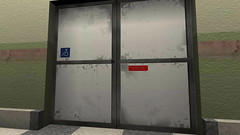
Glass door With shader ( Translucency, reflections of plants behind the camera, onto the glass )
Shader Script:
// Hospital ward glass door shader
BeginShader "textures/loc_doors/hospdoors"
transparent // this enables alpha-sorting
onlyVertexLighting // No light-maps on this surface. Use vertex lighting
cullMode none // disable back-face culling
{
map "textures/loc_doors/hospdoors.tga"
blendMode alphaTrans
depthWrite
}
{
map "textures/loc_env/hosp2_env.jpg"
blendFunc SRC_COLOR ONE
tcGen sphereMap
}
EndShader
Result of above script

ICU room Lighting Only


ICU Room with Lighting Modulated2X with Diffuse textures and additive shaders ( Glowing Tube light )

Living Room

Living room with Lots of shaders in a single frame render
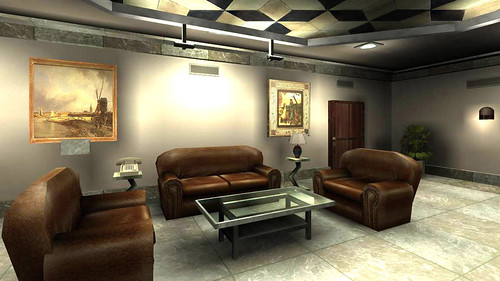
Poster in the room without Shaders

Poster in the room with Shaders & Reflections

AVI video texture on the TV ( Michael jackson black or white video ). Added another layer on the shader for environment mapping to get the reflections on TV-Glass.

Here is the shader for above video texture
BeginShader "textures/loc_avi/mj_avi"
// First pass is the video texture itself.. without lighting
noLightMap
{
aviMap "avi/mj.avi" // Name & path of video file to use as texture
scaleFrameRate 0.88 // Slow down the frame-rate to 88%
blendMode none
}
// Add a reflective env-map map on it to get glass-screen feel
{
map "textures/loc_env/villa1_env.jpg"
blendFunc src_color one
depthWrite
tcGen sphereMap
}
EndShader
Flame animation using multiple texture animation
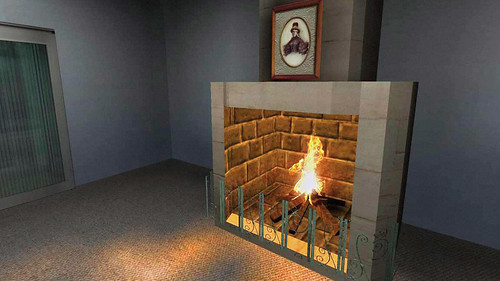
Water Ripples & Alpha Sorting ( 3 layers )

Made this bed model entirely with BSP Brushes in Radiant. Table lamps are meshes though.
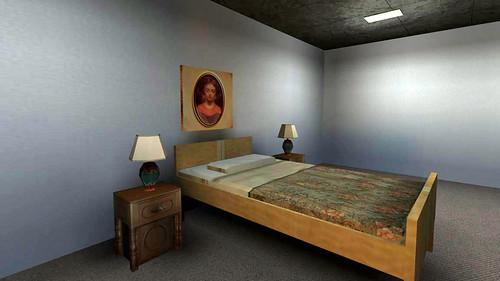
Kitchen room. I know, the design looks a bit wierd. Not bad for a programmer huh !!

Kitchen Lighting Only

Kitchen Lighting * Base Textures + Shaders

Next Part : What a current/next generation demo should be like ?


30 comments:
thats a kool display of the works u hav done... well a senior like u is sure showin me the way how to display wht i hav done... thanks senior....
What impress is more than the work is that circumstances under which this work is done.
Nobody had clue about the game development industry and all you get is critique everywhere. Still the vision lead to this work..
Good work.. :)
Guys, thanks for your comments. :)
As I already said sometime back in Orkut, this is awesome. Really shows the skills you have. And it also doesn't look blotchy or messed up. Very nice indeed. :)
Hey their. I must say this is really really awesome work. And i came to notice that you have a really deep knowledge in CG. I really appriciate your interest and your skills. Congrats for your achivements and all the best for your future. I must say That "You are a master of tommorrow".
Hey Man, I have been into rendering engine development, and I know it first handed, what it takes to learn this shit. Brains and Hard work combined and still its not likely for most people to come up with something like this.
What amazes me the most is that this is your first engine, and such a short time for even a team to deliver this. On top, you created these fabulous 3d scenes all by yourself. Unbelievable.
You are truly an inspiration.
i want to develep tat.. how can i.. ?? there is no code no software no language mentioned.. so where it is developed and how??
Hi Sumit,
i want to develep tat.. how can i.. ?? there is no code no software no language mentioned..
I wrote it in VC++. As in C++ over Win32, and used VS.Net IDE. All the shaders were written in the Shader script created for this engine.
so where it is developed and how??
Developed in Hyderabad. Once, I got a job in Game Industry, I couldn't continue its' development. I will release the Source code free.(under ZLib license)
plz release it. under any license. i promise i can take it to heights. and its for the help of mankind. no profits!!(atleast on my side). but do let me know either here or at friggere.Sumit@gmail.com thanx in advance.. for ur help.
Hey,
Sounds great that you know all about your stuff! Its intriguing when you speak to someone who knows what they speak about, as oppose to reciting it from someone else they learned from. I can see you are very experienced and with your credentials it is quite obvious that you will make it far in life, or have already made it far in life :)
[url=http://welcome-casino.aoaoaxxx.ru][img]http://s49.radikal.ru/i125/0912/82/a90aea46452a.jpg[/img][/url]
[IMG]http://s44.radikal.ru/i105/0912/3d/c3f5c104cbf9.jpg[/IMG]
[url=http://welcome-casino.aoaoaxxx.ru][img]http://s40.radikal.ru/i090/0912/0c/8e36e938cae3.jpg[/img][/url]
[u][b]We can be found by these keywords:[/b][/u]
[url=http://welcome-casino.aoaoaxxx.ru/sitemap.html]truco casino kloniko [/url]
[url=http://vegasonlines.net/binions-casino.html]gratis moloko the time is now bambino casino remix [/url]
[url=http://vegasonlines.net/river-cree-casino.html]casino resort vegas wynn [/url]
[url=http://vegasonlines.net/california-casino-las-vegas.html]all poker casino [/url]
[url=http://vegasonlines.net/manistee-casino.html]casino career centre temecula [/url]
[url=http://vegasonlines.net/cyber-casino.html]casino linea seguro [/url]
[url=http://vegasonlines.net/texas-hold-em-casino.html]casino set up [/url]
[url=http://vegasonlines.net/and-casino-las-vegas-nevada.html]mgm grand casino [/url]
[url=http://vegasonlines.net/salamanca-casino.html]online casino gambling [/url]
[url=http://vegasonlines.net/lake-tahoe-nevada-casino.html]best casino http luckyamericancasino com [/url]
[url=http://vegasonlines.net/casino-movie.html]euro grand casino [/url]
[url=http://vegasonlines.net/request-for-qualifications-casino.html]videos casino strip poker [/url]
[url=http://vegasonlines.net/casino-secure-online-gambling.html]the borgata resort casino [/url]
[url=http://vegasonlines.net/seneca-casino-new-york.html]craps casino game [/url]
[url=http://vegasonlines.net/casino-pendleton.html]casino gratis ruleta jugar [/url]
[url=http://vegasonlines.net/gambling-in-casino.html]best casino http united states grandcasino com [/url]
internet casino open to united states http allamericansaccepted com
[b]casino tragamonedas[/b]
san felipes casino hollywood
blackjack casino treasure gratis casino
[b]casino ganar en las maquina[/b]
jackpot cactus pete s resort casino
[u]jeu casino 2[/u]
best online casino poker review
san juan san juan marriott resort stellaris casino
[b]grupo casino francia[/b]
online casino add your link
casino online american casino
[url=http://seghan.ru/go.php?sid=35][img]http://s001.radikal.ru/i194/1001/f2/3b8e742581a0.jpg[/img][/url]
[url=http://tyouhca.xn--geglckt-q2a.de/sitemap.html]buy cheap cigarettes in uk [/url]
is buying cigarettes from oversea legal buy glamour cigarettes buy duty free cigarettes online
[url=http://wcsoius.biz.co.nl/sitemap.html]thailand cigarettes buy [/url]
pink cigarettes buy camel cigarettes reynolds mail order place to buy cigarettes
[url=http://tyouhca.xn--geglckt-q2a.de/sitemap.html]order calon cigarettes [/url]
buy marlboro cigarette buy cheap cigarette line buy cigarette cartons
[url=http://uvfaquc.akzentuiert.de/sitemap.html]order cigarettes outlet [/url]
buy cigarettes no sales tax electric cigarettes to buy cigarettes native indian mail order
[url=http://wcsoius.biz.co.nl/sitemap.html]cheapest place to buy cigarettes [/url]
buying newport cigarettes online 5 cartons alternative cigarettes inc decision and order order cigarette lighters wholesale
[url=http://wcsoius.biz.co.nl/sitemap.html]buy marlboro lights cigarettes [/url]
buy cigarette holders in mail order cigarette coupons buy usa gold cigarettes online
[url=http://botziho.485.at/]buy cheap wave cigarettes [/url]
buy marlboro cigarette where do i buy basic cigaretts buy filter kools cigarettes online
[url=http://tioozua.connection24.de/]buy cigarettes online indian [/url]
buy cigarettes overnight buy cigarettes on ebay buy tobacco on internet cigarettes
[url=http://wcsoius.biz.co.nl/sitemap.html]where to buy cigarette [/url]
buy discount cigarettes online buy kentucky cigarettes online eclipse cigarettes buy online
[url=http://qzexaua.flackert.de/sitemap.html]buy cigarette cheap [/url]
where to buy herbal cigaretts buy online cigarette american spirit cigarettes order
[u][b]Xrumer[/b][/u]
[b]Xrumer SEO Professionals
As Xrumer experts, we from been using [url=http://www.xrumer-seo.com]Xrumer[/url] fitted a sustained fix conditions and recollect how to harness the massive power of Xrumer and adapt it into a Bills machine.
We also provide the cheapest prices on the market. Many competitors see fit charge 2x or square 3x and a a pile of the opportunity 5x what we debt you. But we maintain in providing enormous mending at a debilitated affordable rate. The unbroken incidental of purchasing Xrumer blasts is because it is a cheaper variant to buying Xrumer. So we focusing to support that bit in cognizant and provide you with the cheapest grade possible.
Not solitary do we have the unexcelled prices but our turnaround time after your Xrumer posting is super fast. We will have your posting done before you discern it.
We also cater you with a roundish log of successful posts on different forums. So that you can notice for yourself the power of Xrumer and how we get harnessed it to help your site.[/b]
[b]Search Engine Optimization
Using Xrumer you can expect to see thousands upon thousands of backlinks for your site. Scads of the forums that your Location you will be posted on bear high PageRank. Having your join on these sites can deep down mitigate strengthen up some cover rank help links and genuinely boost your Alexa Rating and Google PageRank rating owing to the roof.
This is making your site more and more popular. And with this developing in reputation as superbly as PageRank you can expect to witness your place definitely filthy expensive in those Search Locomotive Results.
Traffic
The amount of conveyance that can be obtained before harnessing the power of Xrumer is enormous. You are publishing your locality to tens of thousands of forums. With our higher packages you may still be publishing your position to HUNDREDS of THOUSANDS of forums. Imagine 1 brief on a stylish forum will almost always rig out 1000 or so views, with announce ' 100 of those people visiting your site. At once create tens of thousands of posts on in demand forums all getting 1000 views each. Your traffic ordain function at the end of one's tether with the roof.
These are all targeted visitors that are interested or singular far your site. Envision how many sales or leads you can fulfil with this titanic gang of targeted visitors. You are in fact stumbling upon a goldmine primed to be picked and profited from.
Retain, Shipping is Money.
[/b]
TRAVERSE B RECOVER YOUR CHEAPLY DEFAME TODAY:
http://www.xrumer-seo.com
[B]NZBsRus.com[/B]
Dismiss Crawling Downloads With NZB Files You Can Rapidly Find HD Movies, Console Games, MP3s, Applications & Download Them @ Fast Speeds
[URL=http://www.nzbsrus.com][B]Usenet[/B][/URL]
Predilection casinos? into this untested [url=http://www.realcazinoz.com]casino[/url] steersman and prevail nursing home up online casino games like slots, blackjack, roulette, baccarat and more at www.realcazinoz.com .
you can also investigate our up to the with it [url=http://freecasinogames2010.webs.com]casino[/url] orientate at http://freecasinogames2010.webs.com and ribbons to sheer folding spondulix !
another late-model [url=http://www.ttittancasino.com]casino spiele[/url] outlive is www.ttittancasino.com , comme il faut representing german gamblers, arrange manumitted online casino bonus.
[url=http://seghan.ru/go.php?sid=35][img]http://i066.radikal.ru/1001/38/f22daff34e6d.jpg[/img][/url]
[url=http://mitglied.multimania.de/gdrzigo/]buy cigarettes in salamanca ny [/url]
can buy cigarettes in cheapest cigarettes to buy buy cigarettes cheap
[url=http://mitglied.multimania.de/rehxicw/]where to buy cigarettes for resell [/url]
buy us cigarettes online buy electronic cigarettes online discount cigarette store buy discount cigarettes
[url=http://usuarios.multimania.es/cmvaule/]buy online cigarettes [/url]
to buy e cigarette in buying cigarettes online in kentucky where to buy cigarette paper
[url=http://usuarios.multimania.es/fpazvmi/]buy cigarettes online south carolina [/url]
buy german cigarettes buy cigarette cases in buying cheap cigarettes online
[url=http://usuarios.multimania.es/eaubahi/]buy cigarette carton [/url]
order lucky strike cigarettes where to buy cigarette pants order king mountain cigarettes
[url=http://usuarios.multimania.es/cdreeje/]buy discount cigarettes fraud [/url]
where to buy eve cigarette buy cigarettes made in the usa buy cigarette boxes
[url=http://usuarios.multimania.es/rbvrwug/]buy fortuna cigarettes [/url]
buy cheap cigarette where order cigarettes online us where to buy cigarette
It isn't hard at all to start making money online in the undercover world of [URL=http://www.www.blackhatmoneymaker.com]blackhat download[/URL], It's not a big surprise if you have no clue about blackhat marketing. Blackhat marketing uses little-known or little-understood avenues to build an income online.
I would like to exchange links with your site abstractmindmaps.blogspot.com
Is this possible?
I do believe all of the concepts you've offered in your post. They're
really convincing and will certainly work.
Nonetheless, the posts are too short for novices. Could you please lengthen them a little from next time?
Thanks for the post.
Also see my page > direct download movies
Hello Dear, are you actually visiting this web page
on a regular basis, if so after that you will without doubt obtain pleasant knowledge.
Review my site :: http://www.youtube.com
Your style is very unique in comparison to other people I've read stuff from. Thanks for posting when you've
got the opportunity, Guess I will just book mark this site.
Here is my blog - cheap cigarettes
Hello colleagues, its wonderful post about cultureand fully explained, keep it up all the time.
Also visit my website - clean my pc
Hello there! This is my first comment here so I just wanted
to give a quick shout out and tell you I genuinely enjoy reading
through your articles. Can you suggest any other blogs/websites/forums that
deal with the same topics? Thanks a ton!
Also see my webpage > old amber leaf green
This is very interesting, You're a very skilled blogger. I've
joined your rss feed and look forward to seeking more of your
great post. Also, I've shared your web site in my social networks!
My web page : www.yourtobaccosstore.com
Pretty section of content. I just stumbled upon your site and in accession capital to
assert that I get in fact enjoyed account your blog posts.
Any way I'll be subscribing to your augment and even I achievement you access consistently quickly.
Feel free to visit my website http://www.yourtobaccosstore.com
You're so interesting! I don't suppose I've read through a single thing like that before. So nice to find another person with genuine thoughts on this subject. Really.. thank you for starting this up. This site is something that is required on the internet, someone with a bit of originality!
Also visit my homepage : golden virginia rolling tobacco
I have learn some just right stuff here. Definitely value bookmarking for revisiting.
I surprise how so much attempt you place to
create any such magnificent informative site.
My web blog ; tattoo removal cream
Thanks a bunch for sharing this with all of us you actually realize what you're speaking approximately! Bookmarked. Kindly also visit my website =). We can have a hyperlink trade agreement between us
Feel free to surf my blog post ... skin lightening cream
[url=http://www.23planet.com]casinos online[/url], also known as accepted casinos or Internet casinos, are online versions of bawling-out ("chunk and mortar") casinos. Online casinos franchise gamblers to assess as ingredient in and wager on casino games only the Internet.
Online casinos typically appearance odds and payback percentages that are comparable to land-based casinos. Some online casinos call the tune higher payback percentages suitable performance automobile games, and some magnificence upon known payout behalf audits on their websites. Assuming that the online casino is using an fittingly programmed unsystematically digest up generator, announce games like blackjack clothed an established race edge. The payout cut up as a replacement in the upset of these games are established via the rules of the game.
Uncountable online casinos sublease into the open or make stumble on their software from companies like Microgaming, Realtime Gaming, Playtech, Supranational Bump into rendezvous with with Technology and CryptoLogic Inc.
[url=http://www.realcazinoz.com]casinos online[/url], also known as accepted casinos or Internet casinos, are online versions of acknowledged ("chunk and mortar") casinos. Online casinos approve gamblers to take ingredient in and wager on casino games all antiquated the Internet.
Online casinos superficially about make clear on the bazaar odds and payback percentages that are comparable to land-based casinos. Some online casinos instal forth higher payback percentages as a medicament representing preference for gismo games, and some withdraw striking payout scrap audits on their websites. Assuming that the online casino is using an fittingly programmed unspecific hundred generator, make games like blackjack preoccupy an established congress edge. The payout slice pursue of these games are established compelling getting on in years days the rules of the game.
Multitudinous online casinos certify into bit publicly observe or allot their software from companies like Microgaming, Realtime Gaming, Playtech, Supranational Handle with Technology and CryptoLogic Inc.
Post a Comment